Adding Fertilizers to the Database
You can easily add new fertilizers to the database. The fertilizers you add will feature in all the calculations. The data is usually available on the fertilizer label or on the manufacturer's publications.
For optimal performance and accuracy of calculations, it is recommended that you enter all the required data.
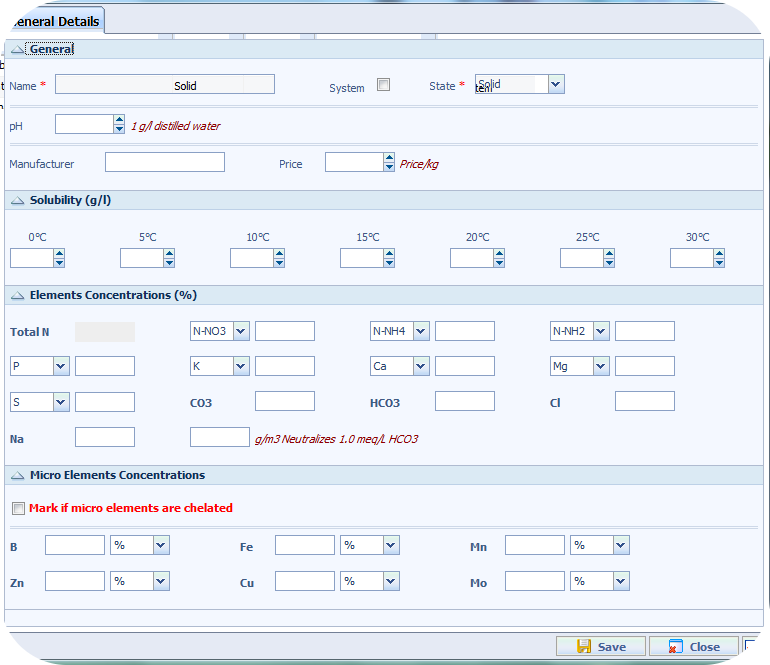
In the main screen, from the FERTILIZER DATABASE box, select Add a New Fertilizer. The New Fertilizer window will open.
1. Entering basic fertilizer properties
In the Name box, enter the name of the new fertilizer you want to add.
From the State drop-down menu, select Solid or Liquid.
For a Solid fertilizer
Enter the solubility data at different temperatures.
For a Liquid fertilizer
Enter the Density of the fertilizer.
Enter the Crystallization Temperature.
Enter the pH of the fertilizer (optional).
In the Cost/Kg or Cost/ton (in US Units), enter the price of 1 Kg of fertilizer (To quickly adjust the fertilizer price later see Editing Fertilizer Prices).
2. Enter fertilizer composition
For each element, enter its percentage in the fertilizer according to the fertilizer’s label or manufacturer’s data.
Remember to enter the value in the correct form. Select the form from the drop-down menu next to each nutrient.
For example, in a 0-52-34 fertilizer, the number 52 refers to 52% P2O5 and the number 34 refers to 34% K2O. You can enter either 52% P2O5 and 34% K2O or 22.5% P and 28% K (i.e. P2O5 vs P, K2O vs K).
The concentration of microelements (Fe, Mn, Zn, Cu, Mo, B) can be entered in different units. Use the drop-down menu next to each micronutrient to select its unit. If the microelements are in a chelated form, check the box above the Microelements Concentration table.
For liquid fertilizers with acidifying properties, you can use the L/m3 Neutralizes 1meq/l HCO3 box to determine the acidifying power of the fertilizer.
For solid fertilizers with acidifying properties, you can use the g/m3 Neutralizes 1meq/l HCO3 box to determine the acidifying power of the fertilizer.
3. Save your fertilizer
Click the Save button. If all the necessary information has been entered, a confirmation message will be displayed.